Metadata

MetaEdit Plus

Advanced Tag Editor

Nothing is written until it has been reviewed.

This page describes MetaEdit Plus 2.0.0, published on 23 September 2026.

MetaEdit Plus is a metadata workstation for audio and video collections. It combines direct field editing with reviewed batch operations, complete artwork collections, filename automation, provider-assisted identification, library analysis, lyrics, chapters, loudness measurement and guarded automation.

Its principle is a single path to the file. Edits, artwork, lyrics, rules, imports and analysis results are proposals until they enter one staged review, and a write is checked before it begins and can be undone after it ends.

Audio formats
23
Video containers
6
Field sections
5
Identification sources
4
Levels of undo
20
Files per automated job
500

Editing

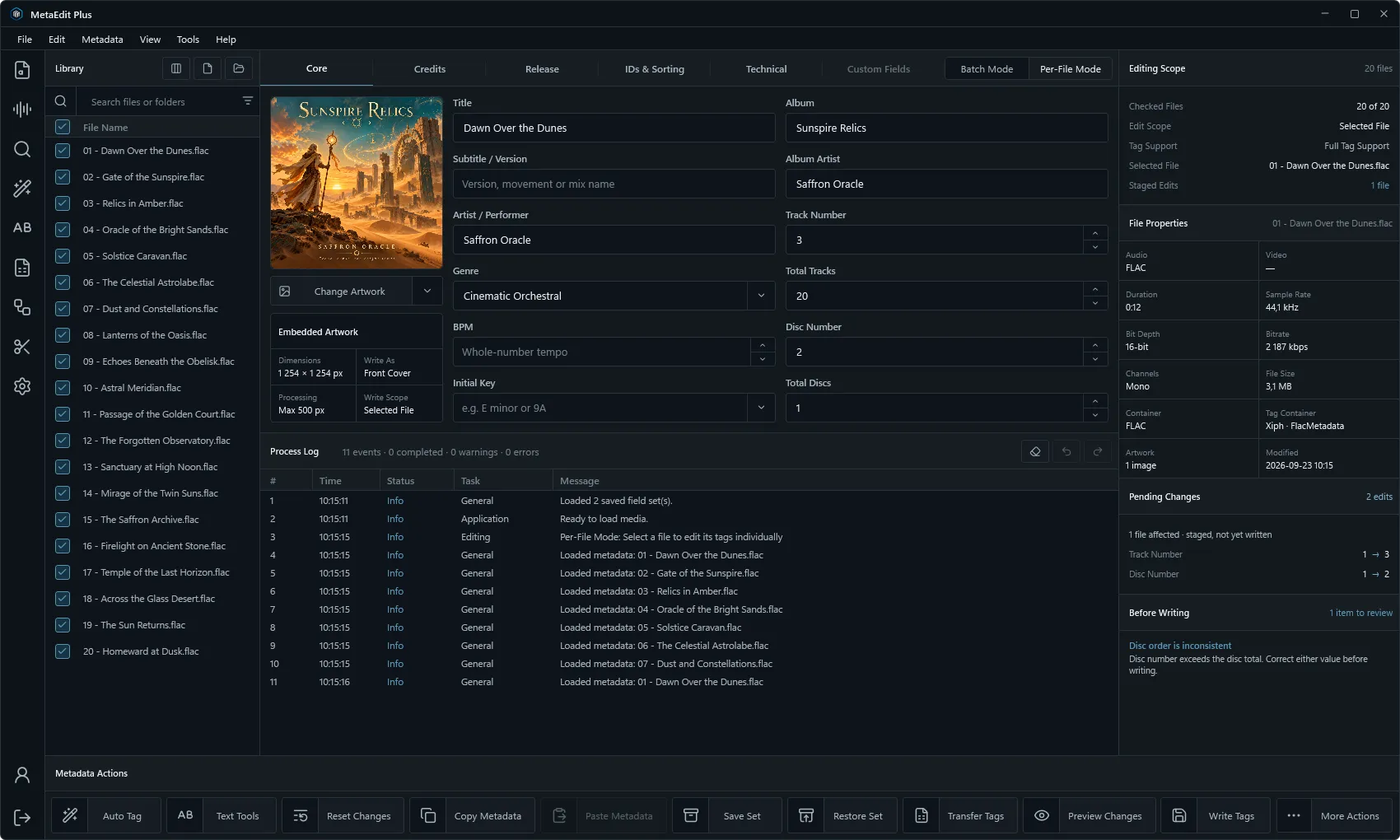
Open files, folders or playlists, check the rows that belong to the work, and edit one file with precision or many together. In Batch Mode only the fields you deliberately change are applied; an untouched blank never becomes a clear.
MetaEdit Plus editor with library, tag fields, embedded artwork, process log and pending changes
The editor, with pending changes at the right
Batch and per-file
Shared values across the checked files, or a separate staged state for each.
Fields
Five configurable sections: core, credits, release, identifiers and sorting, and technical values including ReplayGain.
Native tags
Custom and format-specific entries for ID3v2, Vorbis comments, APEv2, MP4, ASF and Matroska.
Search
File names and metadata expressions with Boolean operators, presence checks, comparisons and guarded regular expressions.
Review Before Write

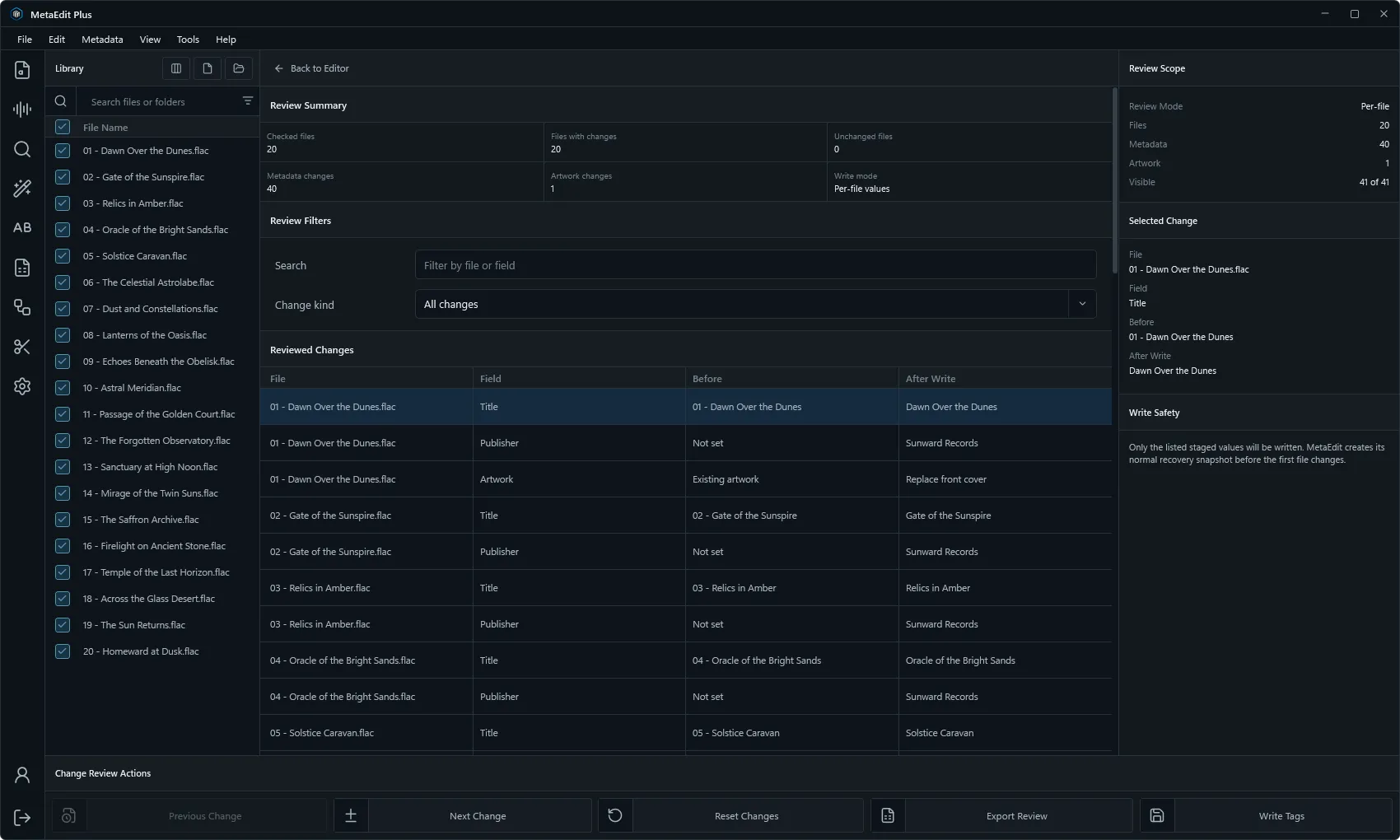
The change set shows each file and each value that will change. Write Tags validates scope and eligibility first, reports failures per file, and preserves the fields, extended values and artwork it was not asked to touch.

MetaEdit Plus change review listing staged values per file
Change review
Staging
Editor values, artwork, provider choices, lyrics, ReplayGain, rules and imports all pass through one review.
Undo and redo
Up to twenty levels, capturing metadata, extended fields and the complete ordered artwork collection before each write.
Process log
A record of what was done, when, and with what result, with filters and selectable columns.
Refusal over loss
Where a container cannot hold a value, the operation is disabled rather than silently dropping data.

Identification

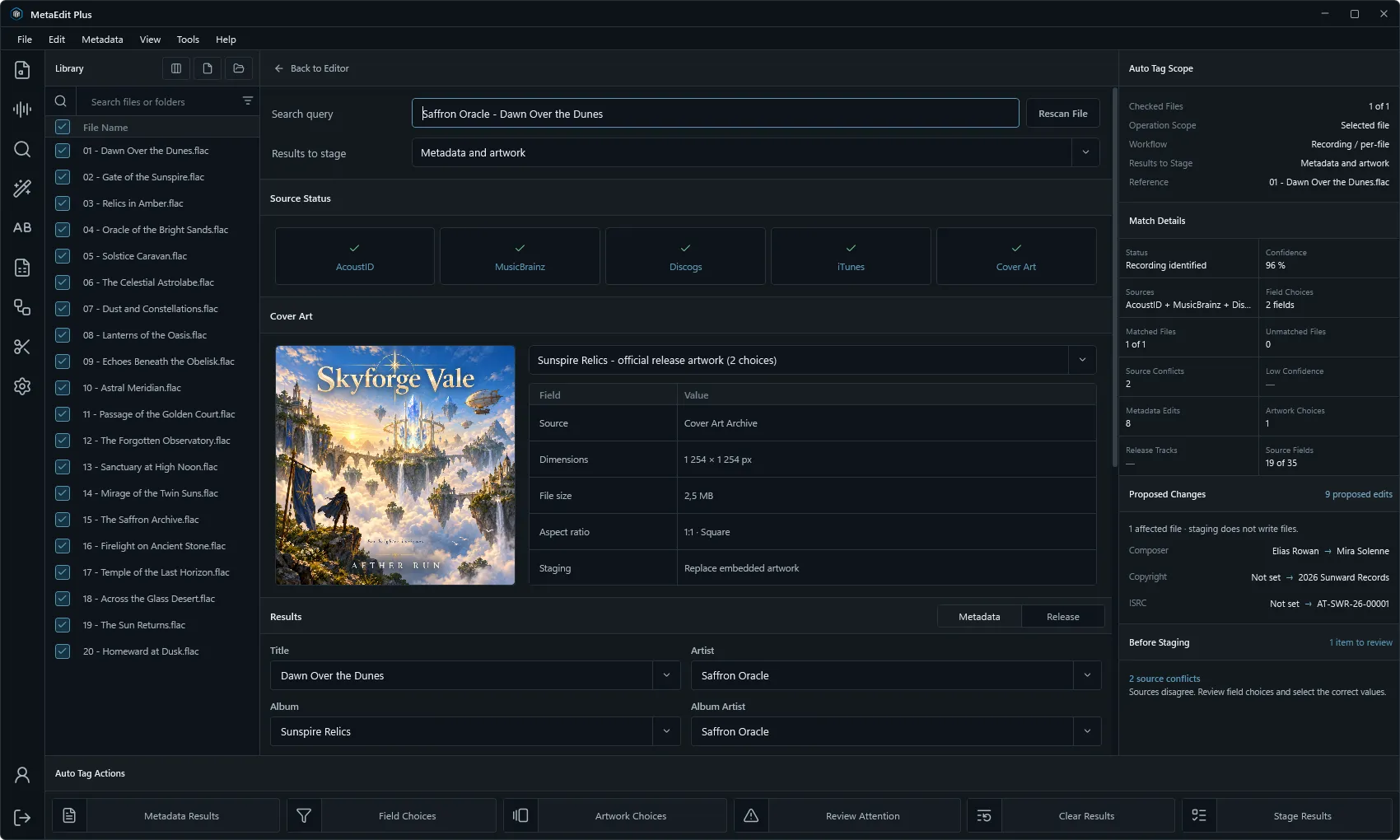
Auto Tag identifies a single recording by its acoustic fingerprint, or maps the files of an album to the tracks of a chosen release. It shows its confidence, its sources and its conflicts, and it stages nothing until you accept it.

MetaEdit Plus automatic tagging workspace with release matching
Release matching in Auto Tag
Identification sources
SourceRole
AcoustIDAcoustic-fingerprint lookup
MusicBrainzRecordings, releases, editions and track mapping
DiscogsOptional catalogue evidence, with your own token
iTunesSupplementary catalogue data and artwork

Text, Patterns and Rules

The tools for correcting a thousand files as carefully as one. Each builds a preview of every proposed change before anything is staged.

Find and replace
Literal or regular-expression replacement, whole-word matching, prefixes and suffixes, case conversion and whitespace normalisation.
File patterns
Tags from file names, file names from tags, and rearrangement of existing name parts, with collision checks and rollback.
Rule Studio
Conditions combined with All or Any, then ordered actions: set, copy, clear, transform, format and sequence. Rules are saved and exchanged as JSON.
Expressions
Fields, file properties, string operations, comparisons, arithmetic and Boolean logic in one expression language.

Library Care

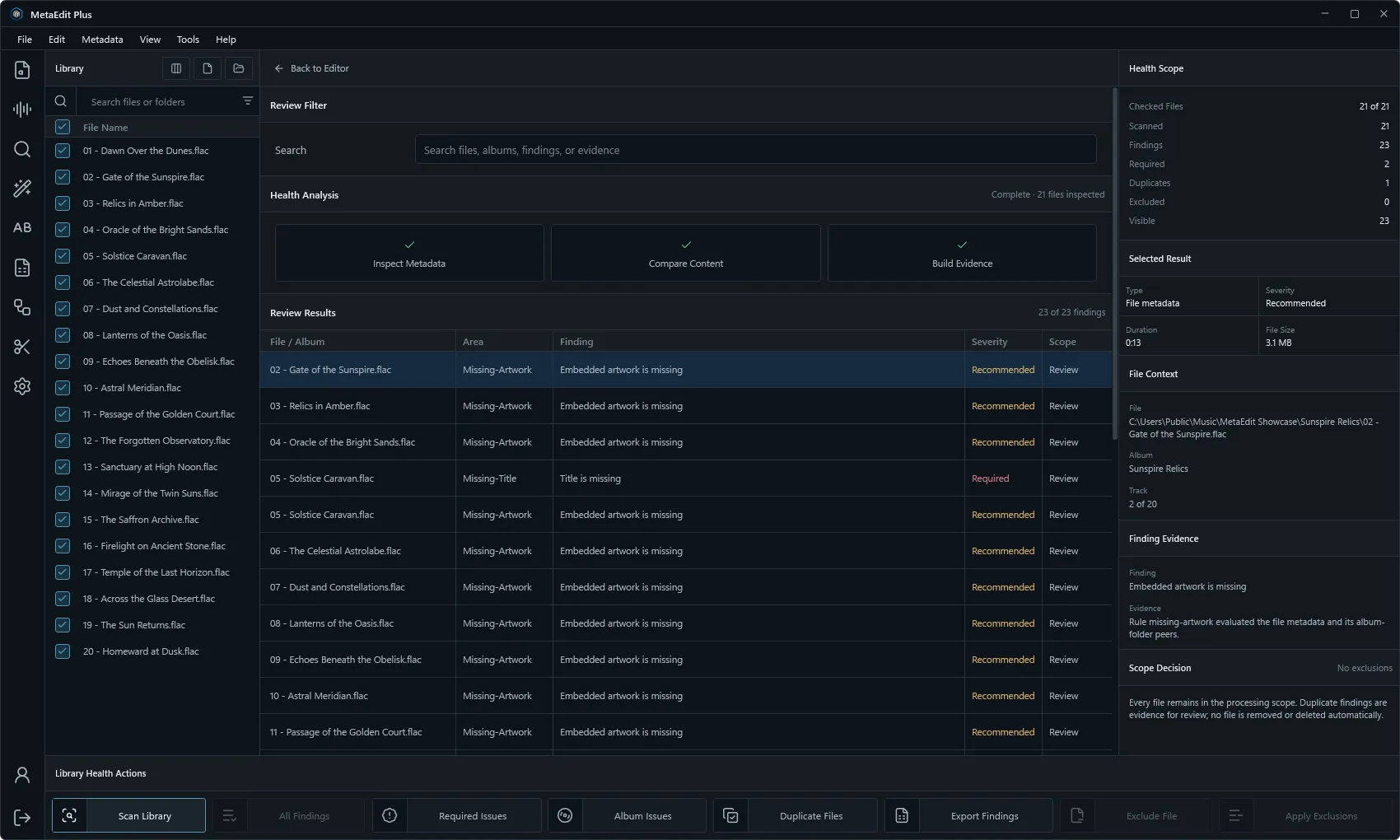
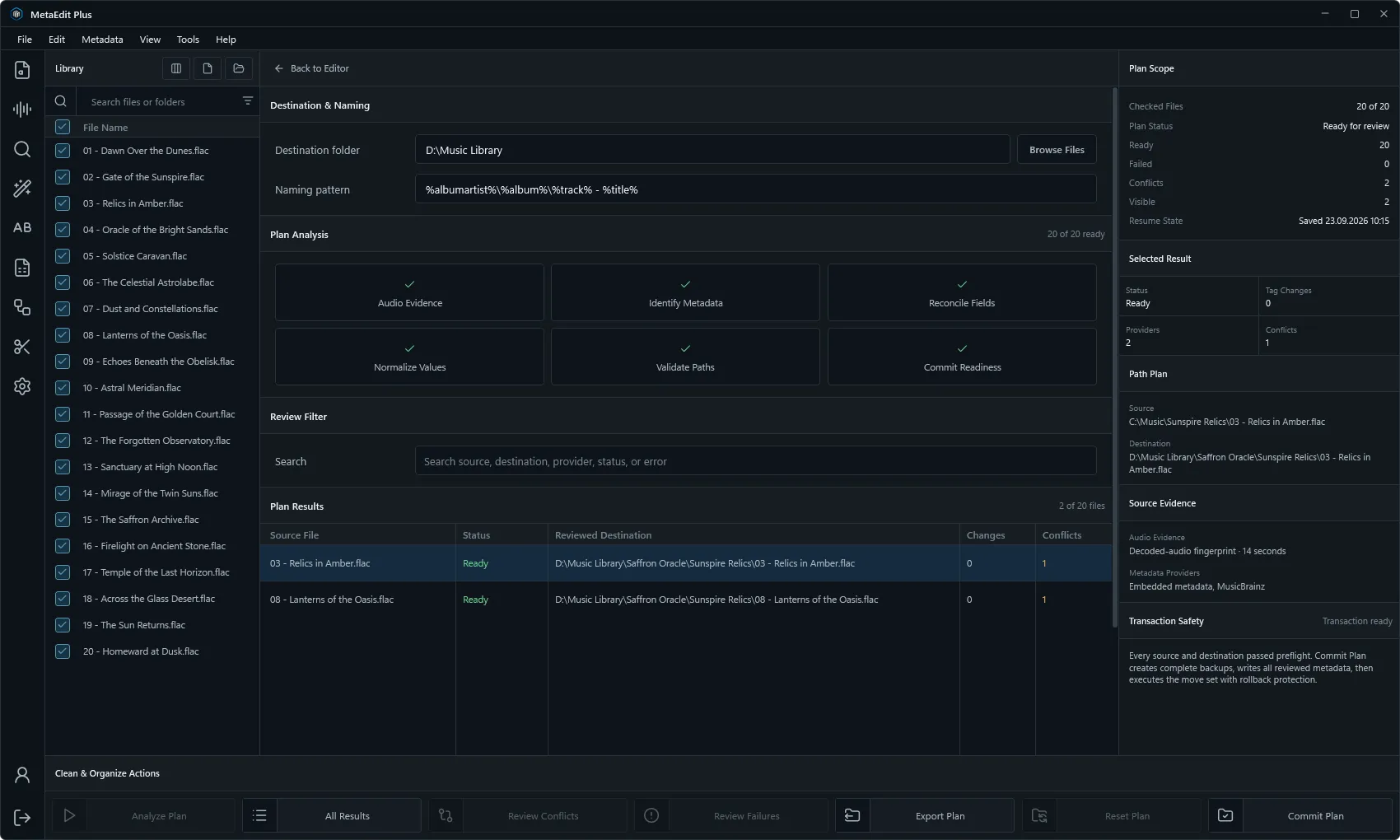
Clean & Organize builds a resumable plan to normalise metadata and move or rename files, with conflict review and rollback. Library Health examines a collection and changes nothing.

MetaEdit Plus library health report
Library Health
Clean & Organize
Analysis, conflict review, destination review and commit are separate steps. A commit creates backups and rolls back if a later step fails.
Library Health
Unreadable tags, missing fields, album inconsistencies, numbering gaps, artwork differences, moved files and duplicates.
Persistent libraries
Chosen folders indexed locally, with named layouts for columns, order and sorting.
Field sets
Reusable values and artwork collections, container mappings and a validated profile backup.

Artwork, Chapters and Lyrics

The parts of a file beyond its text fields, handled with the same staging and the same care.

MetaEdit Plus artwork collection manager
The artwork collection
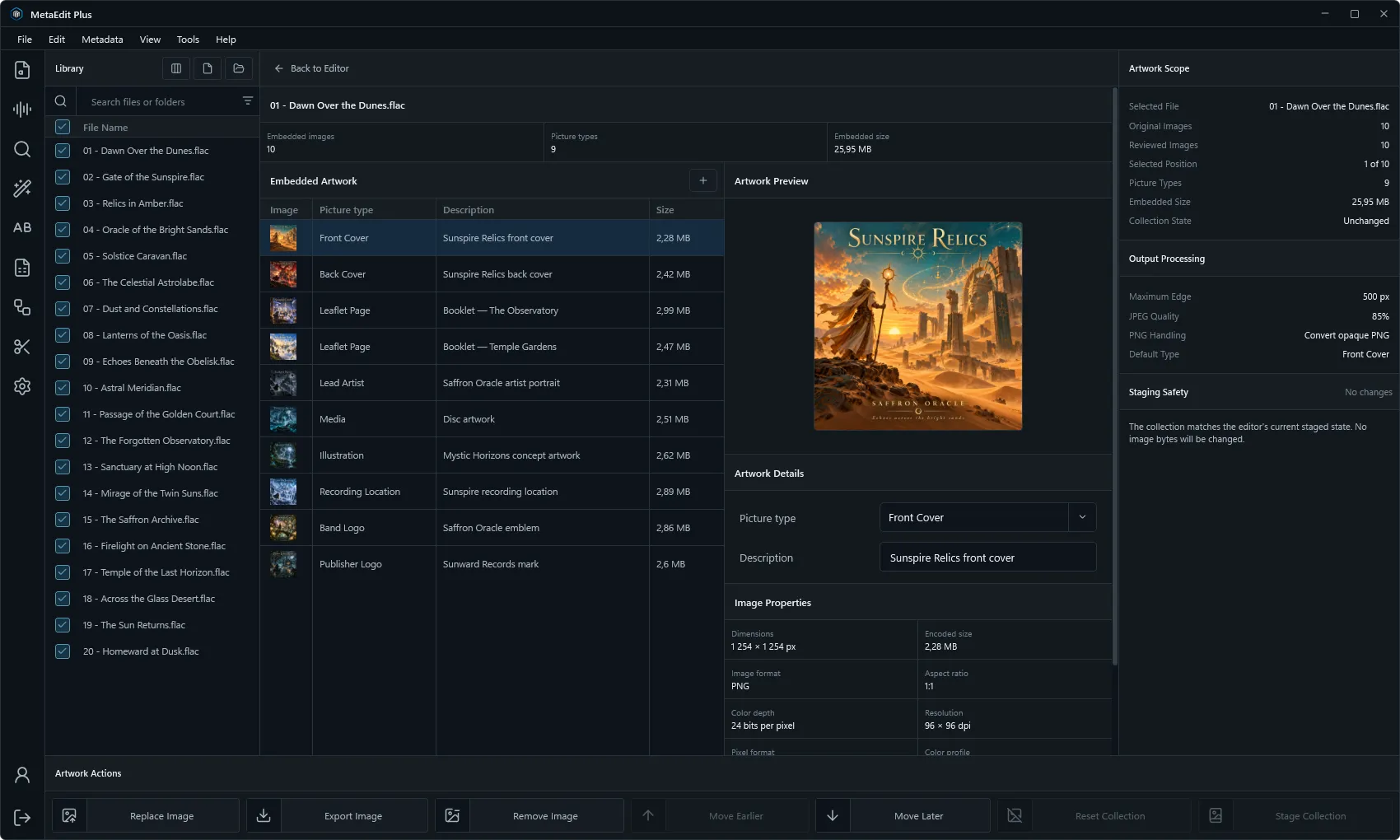
Artwork
Every embedded picture in stored order: add, replace, reorder, describe, inspect, export and remove without flattening the rest.
Chapters
Validated chapter editing for Matroska, WebM, MP4, M4V and MOV, with sidecar import and export.
Lyrics
Search, ranked by metadata and duration; plain and synchronised lyrics, staged or exported as TXT or LRC.
ReplayGain
Gated integrated loudness and ReplayGain 2 track and album values, staged as tags without altering the audio.
Video
Television and film fields and stream properties for video containers.

Transfer and Studio Automation

Metadata enters and leaves in open formats, and the same engine runs unattended for studio libraries. An automated job is review-only until a write is explicitly permitted twice: in the job and on the command line.

MetaEdit Plus Clean and Organize plan
A Clean & Organize plan
Import
Reviewed CSV and line-pattern text import, with matched, skipped and preserved values reported.
Export
CSV, JSON, HTML, tab-separated text and M3U playlists, written atomically.
Automation
Dry-run, commit and watch-folder jobs of up to 500 files per transaction, with backups and SHA-256 evidence of source and output.
Privacy
All editing works without an account. Optional preference sync is off by default.
In practice

Who it is for

Collectors

Bring a library to one standard of naming, numbering and artwork.

Labels and studios

Prepare deliveries with consistent credits, identifiers and release data, and prove what was changed.

Archivists

Audit a collection for gaps, inconsistencies and duplicates without altering a file.

Compatibility

Supported formats

The file types MetaEdit Plus works with in its current release.

Audio
MP3WAVFLACOGGOGAOPUSWVWMAAACM4AM4BAIFAIFFAPEDSFMKAMPCMPPOFROFSSPXTAKTTA
Video
MP4MKVMOVWMVM4VWEBM
Editions

Free to use

MetaEdit Plus is freeware. The complete application is available without payment.

MetaEdit Plus Freeware

Free

  • 46 canonical audio tag fields and video container metadata
  • Batch editing, artwork, rules and native chapters
  • Indexed libraries, library health and CSV/JSON interchange
Install with Studio Hub
Everything included in MetaEdit Plus.
Feature Included
Batch and per-file metadata editing Included
Canonical audio tag fields 46 fields
Artwork collections Included
Rules and filename patterns Included
Persistent indexed libraries Included
Native chapter editing Included
CSV, JSON and playlist interchange Included
Assisted tagging and cover search Included
Library health and duplicate review Included
ReplayGain analysis and lyrics lookup Included
Reusable field sets and editor layouts Included
Undo and redo Included
Video container metadata Included
Optional account preference sync Included

Use is governed by the License Agreement.

Requirements

System requirements

Minimum

  • Windows 10 (64-bit), version 1809 or later
  • Dual-core x64 processor at 1.5 GHz
  • 4 GB RAM
  • 500 MB of free disk space, plus space for recovery snapshots
  • 1280 × 720 display

Recommended

  • Windows 10 or 11 (64-bit), version 21H2 or later
  • Quad-core x64 processor at 2.0 GHz or higher
  • 8 GB RAM; 16 GB for very large libraries
  • SSD storage
  • 1920 × 1080 display or higher

A native Windows application. The required runtime is included in the installer.

Metadata, artwork and chapter support depends on the media container.

Questions

Asked and answered

Can a batch edit be undone?

Yes. Supported writes capture the previous metadata and artwork first, and up to twenty levels are kept. Undo is a recovery feature and not a substitute for independent backups of valuable media.

Does MetaEdit Plus change my audio?

No. It writes metadata. ReplayGain analysis stages tags only; the audio is neither normalised nor re-encoded.

Do I need an account?

No. All editing works without one. Optional cloud sync is off by default and covers portable preferences only.

What does MetaEdit Plus cost?

MetaEdit Plus is freeware. The complete application is available without payment.